# SpringIOC 概述
🚀本篇章代码 Demo 在日常开发中,创建对象的操作随处可见以至于对其十分熟悉又感觉很繁琐,每次需要对象都需要亲手
new一个对象出来,甚至某些情况下由于不好的编程习惯可能还会造成对象无法被回收,就会非常糟糕,我们一直提倡的松耦合,少入侵原则,这种情况下变得一无是。前辈们开始谋求改变这种编程陋习,考虑如何使编码更加解耦合,由此而来的解决方法是面向接口编程,未使用接口和使用接口后的代码如下:
# 1️⃣ 使用接口前的做法 - before
package top.rem.rain.demo1.before; | |
import java.util.ArrayList; | |
import java.util.List; | |
/** | |
* @Author: LightRain | |
* @Description: 系统类 | |
* @DateTime: 2023-12-30 22:27 | |
* @Version:1.0 | |
**/ | |
public class SystemDaoImpl { | |
/** | |
* 打印系统信息 | |
*/ | |
public void systemInfo() { | |
List<String> list = new ArrayList<String>(); | |
list.add(String.format("Java运行版本:%s",System.getProperty("java.version"))); | |
list.add(String.format("Java供应商:%s",System.getProperty("java.vendor"))); | |
list.add(String.format("Java安装目录:%s",System.getProperty("java.home"))); | |
list.add(String.format("操作系统名称:%s",System.getProperty("os.name"))); | |
list.add(String.format("操作系统架构:%s",System.getProperty("os.arch"))); | |
list.add(String.format("操作系统版本:%s",System.getProperty("os.version"))); | |
list.add(String.format("用户名称:%s",System.getProperty("user.name"))); | |
list.add(String.format("用户主目录:%s",System.getProperty("user.home"))); | |
list.forEach(System.out::println); | |
} | |
} |
package top.rem.rain.demo1.before; | |
/** | |
* @Author: LightRain | |
* @Description: 系统业务层 | |
* @DateTime: 2023-12-30 22:28 | |
* @Version:1.0 | |
**/ | |
public class SystemServiceImpl { | |
/** | |
* 实体类对象 | |
*/ | |
private SystemDaoImpl system; | |
public void getSystemInfo(){ | |
// 未使用接口的做法 | |
system = new SystemDaoImpl(); | |
system.systemInfo(); | |
} | |
} |
# 2️⃣ 使用接口后的做法 - after
package top.rem.rain.demo1.after; | |
/** | |
* @author LightRain | |
*/ | |
public interface SystemDao { | |
/** | |
* 打印系统信息 | |
*/ | |
void systemInfo(); | |
} |
package top.rem.rain.demo1.after; | |
import java.util.ArrayList; | |
import java.util.List; | |
/** | |
* @Author: LightRain | |
* @Description: 系统实现类 | |
* @DateTime: 2023-12-30 22:43 | |
* @Version:1.0 | |
**/ | |
public class SystemDaoImpl implements SystemDao { | |
/** | |
* 打印系统信息 | |
*/ | |
@Override | |
public void systemInfo() { | |
List<String> list = new ArrayList<String>(); | |
list.add(String.format("Java运行版本:%s", System.getProperty("java.version"))); | |
list.add(String.format("Java供应商:%s", System.getProperty("java.vendor"))); | |
list.add(String.format("Java安装目录:%s", System.getProperty("java.home"))); | |
list.add(String.format("操作系统名称:%s", System.getProperty("os.name"))); | |
list.add(String.format("操作系统架构:%s", System.getProperty("os.arch"))); | |
list.add(String.format("操作系统版本:%s", System.getProperty("os.version"))); | |
list.add(String.format("用户名称:%s", System.getProperty("user.name"))); | |
list.add(String.format("用户主目录:%s", System.getProperty("user.home"))); | |
list.forEach(System.out::println); | |
} | |
} |
package top.rem.rain.demo1.after; | |
/** | |
* @Author: LightRain | |
* @Description: 系统业务层 | |
* @DateTime: 2023-12-30 22:45 | |
* @Version:1.0 | |
**/ | |
public class SystemServiceImpl { | |
/** | |
* 使用接口的做法 | |
*/ | |
private SystemDao systemDao; | |
public void systemInfo() { | |
// 使用接口来创建具体实现类对象 | |
systemDao = new SystemDaoImpl(); | |
systemDao.systemInfo(); | |
} | |
} |
SystemServiceImpl类中由原来直接与SystemDaoImpl打交道变为了SystemDao, 即使SystemDao最终实现依然是SystemDaoImpl,这样做的好处是所有调用都通过接口SystemDao来完成,而接口真正实现类和最终执行者就是SystemDaoImpl类,当替换SystemDaoImpl类时也只需要修改SystemDao指向新实现类即可。
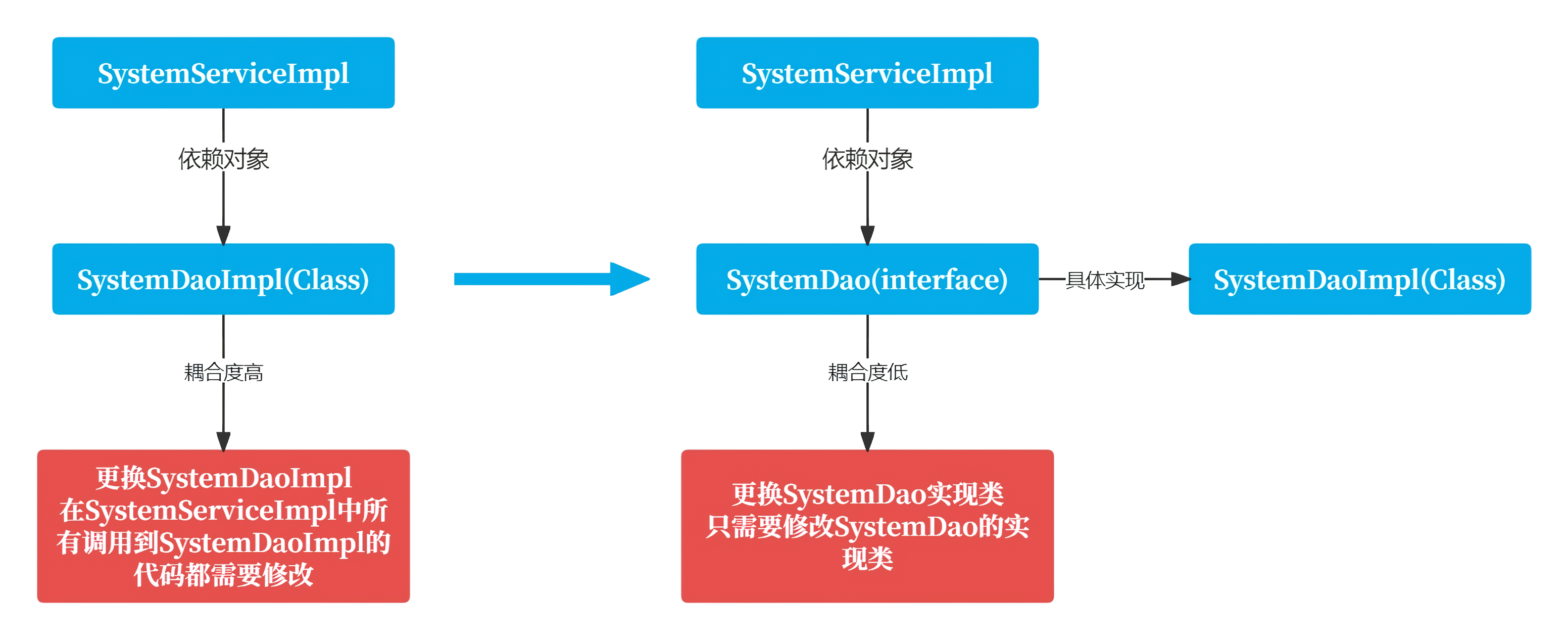
在上述代码中很大程度上降低了代码耦合度,但是代码依旧存在入侵性和一定程度的耦合性,如:在修改
SystemDao实现类时,扔然需要修改SystemServiceImpl内部代码,当依赖的类过多时,查找和修改的过程会非常麻烦,因此我们扔需要寻找一种方式,它可以令开发者无需触及SystemServiceImpl内容代码的情况下实现修改SystemDao的实现类,以便达到最低的耦合度和最少入侵目的。
# 3️⃣ 通过配置文件降低耦合度
实际上存在一种称为反射的编程技术可以协助解决此问题,反射是一种根据给出完整类名来动态生成对象,这种编程方式可以让对象在生成时决定到底是哪一种对象,因此可以这样来做,在某个配置文件,该文件已写好
SystemDaoImpl类的完全限定名,通过读取该文件而获取到SystemDao的真正实现类的完全限定名,然后通过反射技术在运行时动态生成该类,最终赋值给SystemDao接口,这样就可以解决当前问题了,下面使用properties文件作为配置文件,className.properties如下:
systemDao.name = top.rem.rain.demo1.reflection.SystemDaoImpl |
package top.rem.rain.demo1.reflection; | |
import java.lang.reflect.InvocationTargetException; | |
/** | |
* @author LightRain | |
*/ | |
public interface SystemService { | |
/** | |
* 反射创建对象 | |
* @throws ClassNotFoundException | |
* @throws InstantiationException | |
* @throws IllegalAccessException | |
* @throws NoSuchMethodException | |
* @throws InvocationTargetException | |
*/ | |
void reflectionCreationObject() throws ClassNotFoundException, InstantiationException, IllegalAccessException, NoSuchMethodException, InvocationTargetException; | |
} |
package top.rem.rain.demo1.reflection; | |
import org.apache.logging.log4j.util.PropertiesUtil; | |
import org.junit.jupiter.api.Test; | |
import java.lang.reflect.InvocationTargetException; | |
/** | |
* @Author: LightRain | |
* @Description: 系统业务层 | |
* @DateTime: 2023-12-30 22:55 | |
* @Version:1.0 | |
**/ | |
public class SystemServiceImpl implements SystemService{ | |
private SystemDao systemDao; | |
/** | |
* 反射创建对象 | |
* | |
* @throws ClassNotFoundException | |
* @throws InstantiationException | |
* @throws IllegalAccessException | |
* @throws NoSuchMethodException | |
* @throws InvocationTargetException | |
*/ | |
@Override | |
public void reflectionCreationObject() throws ClassNotFoundException, InstantiationException, IllegalAccessException, NoSuchMethodException, InvocationTargetException { | |
// 读取配置文件的工具类 | |
PropertiesUtil propertiesUtil = new PropertiesUtil("className.properties"); | |
// 获取完全限定名称 | |
String className = propertiesUtil.getStringProperty("systemDao.name"); | |
// 通过反射 | |
Class<?> c = Class.forName(className); | |
// 动态生成实例对象 | |
systemDao = (SystemDao) c.getDeclaredConstructor().newInstance(); | |
// 打印系统信息 | |
systemDao.systemInfo(); | |
} | |
@Test | |
public void test() throws ClassNotFoundException, InvocationTargetException, InstantiationException, IllegalAccessException, NoSuchMethodException { | |
SystemServiceImpl systemService = new SystemServiceImpl(); | |
systemService.reflectionCreationObject(); | |
/* | |
执行结果: | |
Java 运行版本:17.0.6 | |
Java 供应商:Oracle Corporation | |
Java 安装目录:C:\LightRainData\IDEA\JDK\JDK-17.0.6 | |
操作系统名称:Windows 11 | |
操作系统架构:amd64 | |
操作系统版本:10.0 | |
用户名称:LightRain | |
用户主目录:C:\Users\LightRain | |
*/ | |
} | |
} |
上述代码的确如我们所愿生成了
SystemDao实例,这样做的好处是在替换SystemDao实现类的情况下只需要修改配置文件的内容,而无需触及SystemServiceImpl内部代码,从而把代码修改的过程转到配置文件中,相当于SystemServiceImpl及其内部的SystemDao通过配置文件与SystemDao的实现类进行关联,这样SystemServiceImpl与SystemDao的实现类间也就实现了解耦合,当然SystemSeviceImpl类中存在着SystemDao对象是无法避免的,我们只能最大程度去解耦合。
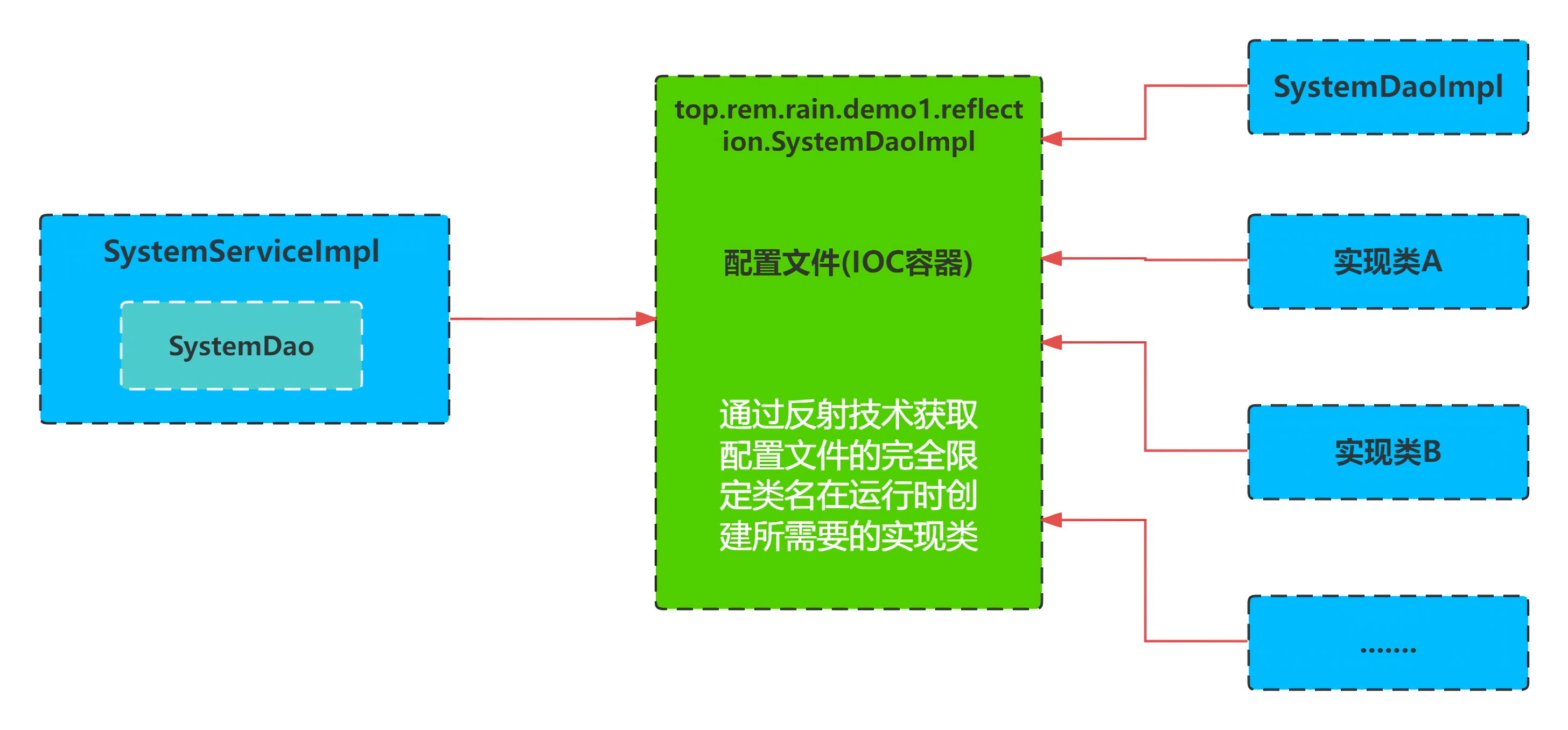
SpringIOC也是一个Java对象,在某些特定时间被创建后,可以进行对其它对象的控制,包括初始化、创建、销毁等。在上述过程中,我们通过配置文件配置了SystemDaoImpl实现类的完全限定名称,通过反射机制在运行时为SystemDao创建具体实现类,包括SystemServiceImpl的创建,Spring的IOC容器都会帮我们完成,而我们唯一要做的就是把需要创建的类和其它依赖的类以配置文件的方式告诉IOC容器需要创建和注入哪些类。
Spring通过这种控制反转(IOC)的设计模式来解耦合,这种方式使一个对象依赖其它对象时会通过被动的方式传进来,而不是通过手动创建这些类,我们可以把IOC模式看做工厂模式的升华版,只不过这个工厂里要生成的对象都是配置文件(XML)中给出定义的,然后利用Java反射技术根据XML中给出的类名生成相应对象。
从某种程度上来讲
IOC相当于把在工厂方法里通过硬编码创建对象的代码,改成了由XML文件来定义,也就是把工厂和对象生成这两者独立分隔开来,目的就是提高灵活性和可维护性,再就是将对象之间的耦合度降到最低,因此我们要明白所谓的IOC就是将对象的创建权交由Spring来完成,让类之间的关系达到最低耦合度状态。
# Spring 快速入门
1️⃣ 使用
SpringIOC功能需要先引入Spring核心依赖包,使用Maven作为构建工具。
<properties> | |
<spring.version>6.1.0</spring.version> | |
<project.build.sourceEncoding>UTF-8</project.build.sourceEncoding> | |
</properties> | |
<!-- 添加 Spring 依赖 --> | |
<dependency> | |
<groupId>org.springframework</groupId> | |
<artifactId>spring-core</artifactId> | |
<version>${spring.version}</version> | |
</dependency> | |
<dependency> | |
<groupId>org.springframework</groupId> | |
<artifactId>spring-beans</artifactId> | |
<version>${spring.version}</version> | |
</dependency> | |
<dependency> | |
<groupId>org.springframework</groupId> | |
<artifactId>spring-context</artifactId> | |
<version>${spring.version}</version> | |
</dependency> |
2️⃣ 创建
AccountDao接口
package top.rem.rain.demo2.dao; | |
/** | |
* @author LightRain | |
*/ | |
public interface AccountDao { | |
/** | |
* 账户信息 | |
*/ | |
void accountInfo(); | |
} |
3️⃣ 创建
Dao具体实现类
package top.rem.rain.demo2.dao; | |
/** | |
* @Author: LightRain | |
* @Description: 实现类 | |
* @DateTime: 2023-12-31 21:01 | |
* @Version:1.0 | |
**/ | |
public class AccountDaoImpl implements AccountDao { | |
/** | |
* 账户信息 | |
*/ | |
@Override | |
public void accountInfo() { | |
System.out.printf("用户名称:%s", System.getProperty("user.name")); | |
} | |
} |
4️⃣ 创建
AccountService接口
package top.rem.rain.demo2.service; | |
public interface AccountService { | |
/** | |
* 获取账户 | |
*/ | |
void getAccount(); | |
} |
5️⃣ 创建
Service具体实现类
package top.rem.rain.demo2.service; | |
import org.junit.jupiter.api.Test; | |
import org.springframework.context.ApplicationContext; | |
import org.springframework.context.support.ClassPathXmlApplicationContext; | |
import top.rem.rain.demo2.dao.AccountDao; | |
import top.rem.rain.demo2.dao.AccountDaoImpl; | |
/** | |
* @Author: LightRain | |
* @Description: 实现类 | |
* @DateTime: 2023-12-31 21:04 | |
* @Version:1.0 | |
**/ | |
public class AccountServiceImpl implements AccountService { | |
/** | |
* 注入对象 | |
*/ | |
private AccountDao accountDao; | |
/** | |
* 获取账户 | |
*/ | |
@Override | |
public void getAccount() { | |
accountDao.accountInfo(); | |
} | |
/** | |
* 通过 set 方法注入依赖对象 | |
* | |
* @param accountDao AccountDao | |
*/ | |
public void setAccountDao(AccountDao accountDao) { | |
this.accountDao = accountDao; | |
} | |
} |
6️⃣ 在创建完上面的接口和具体实现后,下面将通过
SpringIOC容器来帮助我们创建并注入这些类,在项目的resources目录下创建applicationcontext.xml配置文件,具体配置代码如下:
<?xml version="1.0" encoding="UTF-8"?> | |
<beans xmlns="http://www.springframework.org/schema/beans" | |
xmlns:xsi="http://www.w3.org/2001/XMLSchema-instance" | |
xsi:schemaLocation="http://www.springframework.org/schema/beans http://www.springframework.org/schema/beans/spring-beans.xsd"> | |
<!-- 声明 accountDao 对象并交由 Spring 来进行管理与创建 --> | |
<bean name="accountDao" class="top.rem.rain.demo2.dao.AccountDaoImpl"/> | |
<!-- 声明 accountService 对象并交由 Spring 来进行管理与创建 --> | |
<bean name="accountService" class="top.rem.rain.demo2.service.AccountServiceImpl"> | |
<!-- 注入 accountDao 对象需要 set 方法 --> | |
<property name="accountDao" ref="accountDao"/> | |
</bean> | |
</beans> |
从
XML文件中,我们可以看到有一个beans的顶级标签,同时还引入了核心命名空间,Spring的功能在使用时都需要声明相应的命名空间,在上述的xml中的命名空间是最基本的,使用IntelliJ IDEA创建Spring的xml配置文件时默认就会生成。
通过
bean子标签声明那些需要IOC容器帮助我们要创建的类,其中name是指明IOC创建后该对象的名称 (也可以使用id来替代name),class是告诉IOC这个类的完全限定名称,IOC会通过这组信息使用反射技术来帮助我们创建对应的类对象。
在
accountService标签的声明中多出了一个property标签,这个标签指向了刚才创建的accountDao对象,它的作用是把accountDao对象传递给accountService实现类中的accountDao属性,该属性必须拥有set方法才可以注入成功,我们把这种往类对象中注入其它对象的操作统称为依赖注入,其中property标签的name必须与AccountServiceImpl实现类中的变量名称相同。
7️⃣ 在
AccountServiceImpl类中添加一个测试方法,其次使用这些类需要利用Spring提供的核心类,ApplicationContext通过该类去加载已声明好的配置文件,然后就可以获取到我们需要的类了,测试方法如下:
package top.rem.rain.demo2.service; | |
import org.junit.jupiter.api.Test; | |
import org.springframework.context.ApplicationContext; | |
import org.springframework.context.support.ClassPathXmlApplicationContext; | |
import top.rem.rain.demo2.dao.AccountDao; | |
import top.rem.rain.demo2.dao.AccountDaoImpl; | |
/** | |
* @Author: LightRain | |
* @Description: 实现类 | |
* @DateTime: 2023-12-31 21:04 | |
* @Version:1.0 | |
**/ | |
public class AccountServiceImpl implements AccountService { | |
/** | |
* 省略上述重复贴过的代码.... | |
*/ | |
/** | |
* 使用 XML 文件进行配置 | |
*/ | |
@Test | |
public void testAccountXML() { | |
// 通过 ApplicationContext 加载配置文件 | |
ApplicationContext applicationContext = new ClassPathXmlApplicationContext("applicationcontext.xml"); | |
// 多次获取并不会创建多个 accountService 对象,因为 Spring 默认创建是单实例的作用域 | |
AccountService accountService = (AccountService) applicationContext.getBean("accountService"); | |
accountService.getAccount(); | |
/* | |
执行结果:用户名称:LightRain | |
*/ | |
} | |
} |
# Spring 容器装配 - XML & 注解配置方式
# XML 配置方式
采用
xml配置文件的方式对bean进行声明和管理,每一个bean标签都代表着需要被创建的对象并通过property标签可以为该类其它依赖对象,通过这种方式Spring容器就可以成功知道我们需要创建哪些bean实例了。如下:
<?xml version="1.0" encoding="UTF-8"?> | |
<beans xmlns="http://www.springframework.org/schema/beans" | |
xmlns:xsi="http://www.w3.org/2001/XMLSchema-instance" | |
xsi:schemaLocation="http://www.springframework.org/schema/beans http://www.springframework.org/schema/beans/spring-beans.xsd"> | |
<!-- 声明 accountDao 对象并交由 Spring 来进行管理与创建 --> | |
<bean name="accountDao" class="top.rem.rain.demo2.dao.AccountDaoImpl"/> | |
<!-- 声明 accountService 对象并交由 Spring 来进行管理与创建 --> | |
<bean name="accountService" class="top.rem.rain.demo2.service.AccountServiceImpl"> | |
<!-- 注入 accountDao 对象需要 set 方法 --> | |
<property name="accountDao" ref="accountDao"/> | |
</bean> | |
</beans> |
然后通过
ApplicationContext的ClassPathXmlApplicationContext去加载Spring配置文件,来获取想要的实例并调用相应方法执行。
对于
ClassPathXmlApplicationContext默认加载classpath路径下的文件,只需要指明对应文件的classpath路径即可,如果存在多个配置文件,则只需要分别传递即可,ClassPathXmlApplicationContext是一个可以接收可变参数的构造函数。
// 默认查找 classpath 路径下的文件 | |
ApplicationContext applicationContext = new ClassPathXmlApplicationContext("applicationcontext.xml"); | |
// 多文件,也可传递数组 | |
ApplicationContext applicationContext = new ClassPathXmlApplicationContext("applicationcontext.xml","applicationcontext2.xml",...); | |
// 默认为项目工作路径 即项目的根目录 | |
FileSystemXmlApplicationContext applicationContext = new FileSystemXmlApplicationContext("/src/main/resources/applicationcontext.xml"); | |
// 也可以读取 classpath 下的文件 | |
FileSystemXmlApplicationContext applicationContext = new FileSystemXmlApplicationContext("classpath:applicationcontext.xml"); |
# 注解配置方式
下面是通过注解的方式来达到与上述
xml配置的效果,代码如下:
package top.rem.rain.demo2.config; | |
import org.springframework.context.annotation.Bean; | |
import org.springframework.context.annotation.Configuration; | |
import top.rem.rain.demo2.dao.AccountDao; | |
import top.rem.rain.demo2.dao.AccountDaoImpl; | |
import top.rem.rain.demo2.service.AccountService; | |
import top.rem.rain.demo2.service.AccountServiceImpl; | |
/** | |
* @Author: LightRain | |
* @Description: Bean 注解方式的配置 | |
* @DateTime: 2024-01-01 00:38 | |
* @Version:1.0 | |
**/ | |
@Configuration | |
public class BeanConfig { | |
@Bean | |
public AccountDao accountDao(){ | |
return new AccountDaoImpl(); | |
} | |
@Bean | |
public AccountService accountService(){ | |
AccountServiceImpl accountService = new AccountServiceImpl(); | |
accountService.setAccountDao(accountDao()); | |
return accountService; | |
} | |
} |
@Configuration注解表示BeanConfig类是配置文件类,相当于代替了XML的配置文件,这种基于Java注解配置方式是在Spring 3.0中引入的,使用注解进行配置时请确保引入了spring-context坐标。
<dependency> | |
<groupId>org.springframework</groupId> | |
<artifactId>spring-context</artifactId> | |
<version>6.1.0</version> | |
</dependency> |
在
AccountServiceImpl类中再添加一个测试方法,这次使用AnnotationConfigApplicationContext来加载Java配置文件类,执行结果是和XML一样的。
package top.rem.rain.demo2.service; | |
import org.junit.jupiter.api.Test; | |
import org.springframework.context.ApplicationContext; | |
import org.springframework.context.annotation.AnnotationConfigApplicationContext; | |
import org.springframework.context.support.ClassPathXmlApplicationContext; | |
import top.rem.rain.demo2.config.BeanConfig; | |
import top.rem.rain.demo2.dao.AccountDao; | |
/** | |
* @Author: LightRain | |
* @Description: 实现类 | |
* @DateTime: 2023-12-31 21:04 | |
* @Version:1.0 | |
**/ | |
public class AccountServiceImpl implements AccountService { | |
/** | |
* 省略上述重复贴过的代码.... | |
*/ | |
/** | |
* 使用 Java 注解进行配置 | |
*/ | |
@Test | |
public void testAccountBean() { | |
// 通过 ApplicationContext 的 AnnotationConfigApplicationContext 加载配置文件 | |
ApplicationContext applicationContext = new AnnotationConfigApplicationContext(BeanConfig.class); | |
// 名称必须 BeanConfig 中工程方法名称一致 | |
AccountService accountService = (AccountService) applicationContext.getBean("accountService"); | |
accountService.getAccount(); | |
/* | |
执行结果:用户名称:LightRain | |
*/ | |
} | |
} |
我们需要明白的是,在大部分情况下更倾向于使用
XMl来配置Bean相关信息,这样会更加方便对代码进行管理,除了前面通过xml中使用bean标签为每个类声明实例外,Spring还为我们提供了基于注解的声明方式。
# Spring 依赖注入
至于依赖注入就是当一个
bean实例引用到了另一个bean实例时,Spring容器会帮助我们创建依赖bean实例并注入到另一个bean中,在上述案例中的AccountService依赖于AccountDao,Spring容器会在创建AccountService的实现类和AccountDao的实现类后,把AccountDao的实现注入AccountService实例中,下面分别来介绍注入的方式。
# Setter 注入
Setter注入:被注入的属性需要拥有set方法,Setter注入支持基本类型和引用类型,Setter注入是在Bean实例创建完成后执行的,观察入门案例,对象注入使用property标签的ref属性进行注入。
<?xml version="1.0" encoding="UTF-8"?> | |
<beans xmlns="http://www.springframework.org/schema/beans" | |
xmlns:xsi="http://www.w3.org/2001/XMLSchema-instance" | |
xsi:schemaLocation="http://www.springframework.org/schema/beans http://www.springframework.org/schema/beans/spring-beans.xsd"> | |
<!-- 声明 accountDao 对象并交由 Spring 来进行管理与创建 --> | |
<bean name="accountDao" class="top.rem.rain.demo2.dao.AccountDaoImpl"/> | |
<!-- 声明 accountService 对象并交由 Spring 来进行管理与创建 --> | |
<bean name="accountService" class="top.rem.rain.demo2.service.AccountServiceImpl"> | |
<!-- 注入 accountDao 对象需要 set 方法 --> | |
<property name="accountDao" ref="accountDao"/> | |
</bean> | |
</beans> |
其次除了上述的对象注入同时也可以注入简单值和
map、set、list、数组,简单值注入使用property标签的value属性。
package top.rem.rain.demo2.bean; | |
import java.util.List; | |
import java.util.Map; | |
import java.util.Set; | |
/** | |
* @Author: LightRain | |
* @Description: Set 注入示例 | |
* @DateTime: 2024-01-01 11:00 | |
* @Version:1.0 | |
**/ | |
public class Account { | |
/** | |
* 账户信息 | |
*/ | |
private String accountName; | |
/** | |
* 账户密码 | |
*/ | |
private String accountPassword; | |
/** | |
* 系统信息 | |
*/ | |
private List<String> systemInfo; | |
/** | |
* 朋友姓名 | |
*/ | |
private Set<String> friendsName; | |
/** | |
* 书架 | |
*/ | |
private Map<Integer,String> bookshelf; | |
public void setAccountName(String accountName) { | |
this.accountName = accountName; | |
} | |
public void setAccountPassword(String accountPassword) { | |
this.accountPassword = accountPassword; | |
} | |
public void setSystemInfo(List<String> systemInfo) { | |
this.systemInfo = systemInfo; | |
} | |
public void setFriendsName(Set<String> friendsName) { | |
this.friendsName = friendsName; | |
} | |
public void setBookshelf(Map<Integer, String> bookshelf) { | |
this.bookshelf = bookshelf; | |
} | |
@Override | |
public String toString() { | |
return "Account{" + | |
"accountName='" + accountName + '\'' + | |
", accountPassword='" + accountPassword + '\'' + | |
", systemInfo=" + systemInfo + | |
", friendsName=" + friendsName + | |
", bookshelf=" + bookshelf + | |
'}'; | |
} | |
} |
XML配置如下:
<?xml version="1.0" encoding="UTF-8"?> | |
<beans xmlns="http://www.springframework.org/schema/beans" | |
xmlns:xsi="http://www.w3.org/2001/XMLSchema-instance" | |
xsi:schemaLocation="http://www.springframework.org/schema/beans http://www.springframework.org/schema/beans/spring-beans.xsd"> | |
<!-- setter 通过 property 注入属性值,普通类型使用 value --> | |
<bean id="account" scope="prototype" class="top.rem.rain.demo2.bean.Account"> | |
<property name="accountName" value="LightRain"/> | |
<property name="accountPassword" value="123456r"/> | |
<!-- 注入 List --> | |
<property name="systemInfo"> | |
<list> | |
<value>Java运行版本:17.0.6</value> | |
<value>Java供应商:Oracle Corporation</value> | |
<value>Java安装目录:C:\LightRainData\IDEA\JDK\JDK-17.0.6</value> | |
<value>操作系统名称:Windows 11</value> | |
<value>操作系统架构:amd64</value> | |
<value>操作系统版本:10.0</value> | |
<value>用户名称:LightRain</value> | |
<value>用户主目录:C:\Users\LightRain</value> | |
</list> | |
</property> | |
<!-- 注入 Set --> | |
<property name="friendsName"> | |
<set> | |
<value>古河渚</value> | |
<value>古河早苗</value> | |
<value>藤琳杏</value> | |
</set> | |
</property> | |
<!-- 注入 Map --> | |
<property name="bookshelf"> | |
<map> | |
<entry key="1" value="Java并发编程的艺术"/> | |
<entry key="2" value="Java架构之路"/> | |
<entry key="3" value="Java性能权威"/> | |
</map> | |
</property> | |
</bean> | |
</beans> |
在
Account类中添加一个测试方法,用于查看是否可以成功注入,代码如下:
package top.rem.rain.demo2.bean; | |
import org.junit.jupiter.api.Test; | |
import org.springframework.context.ApplicationContext; | |
import org.springframework.context.support.ClassPathXmlApplicationContext; | |
import top.rem.rain.demo2.service.AccountService; | |
import java.util.List; | |
import java.util.Map; | |
import java.util.Set; | |
/** | |
* @Author: LightRain | |
* @Description: Set 注入示例 | |
* @DateTime: 2024-01-01 11:00 | |
* @Version:1.0 | |
**/ | |
public class Account { | |
/** | |
* 省略上述贴过的代码... | |
*/ | |
/** | |
* 测试方法 | |
*/ | |
@Test | |
public void test(){ | |
// 通过 ApplicationContext 加载配置文件 | |
ApplicationContext applicationContext = new ClassPathXmlApplicationContext("account.xml"); | |
// 多次获取并不会创建多个 account 对象,因为 Spring 默认创建是单实例的作用域 | |
Account account = (Account) applicationContext.getBean("account"); | |
System.out.println("account.toString() = " + account.toString()); | |
/* | |
执行结果:account.toString () = Account {accountName='LightRain', accountPassword='123456r', systemInfo=[Java 运行版本:17.0.6, Java 供应商:Oracle Corporation, Java 安装目录:C:\LightRainData\IDEA\JDK\JDK-17.0.6, 操作系统名称:Windows 11, 操作系统架构:amd64, 操作系统版本:10.0, 用户名称:LightRain, 用户主目录:C:\Users\LightRain], friendsName=[古河渚,古河早苗,藤琳杏], bookshelf={1=Java 并发编程的艺术,2=Java 架构之路,3=Java 性能权威}} | |
*/ | |
} | |
} |
# 构造器注入
构造器是通过构造方法注入依赖,构造函数的参数一般情况下就是依赖项,
Spring容器会根据bean中指定的构造器参数来决定调用哪个构造函数,代码如下:
package top.rem.rain.demo3.dao; | |
/** | |
* @author LightRain | |
*/ | |
public interface AccountDao { | |
/** | |
* 账户信息 | |
*/ | |
void accountInfo(); | |
} |
package top.rem.rain.demo3.dao; | |
/** | |
* @Author: LightRain | |
* @Description: 实现类 | |
* @DateTime: 2023-12-31 21:01 | |
* @Version:1.0 | |
**/ | |
public class AccountDaoImpl implements AccountDao { | |
/** | |
* 账户信息 | |
*/ | |
@Override | |
public void accountInfo() { | |
System.out.printf("用户名称:%s", System.getProperty("user.name")); | |
} | |
} |
package top.rem.rain.demo3.service; | |
public interface AccountService { | |
/** | |
* 获取账户 | |
*/ | |
void getAccount(); | |
} |
package top.rem.rain.demo3.service; | |
import top.rem.rain.demo3.dao.AccountDao; | |
/** | |
* @Author: LightRain | |
* @Description: 使用构造器注入依赖 | |
* @DateTime: 2023-12-31 21:04 | |
* @Version:1.0 | |
**/ | |
public class AccountServiceImpl implements AccountService { | |
/** | |
* 需要注入的 Dao 对象 | |
*/ | |
private final AccountDao accountDao; | |
/** | |
* 构造器注入依赖 | |
* | |
* @param accountDao AccountDao | |
*/ | |
public AccountServiceImpl(AccountDao accountDao) { | |
this.accountDao = accountDao; | |
} | |
/** | |
* 获取账户 | |
*/ | |
@Override | |
public void getAccount() { | |
accountDao.accountInfo(); | |
} | |
} |
<?xml version="1.0" encoding="UTF-8"?> | |
<beans xmlns="http://www.springframework.org/schema/beans" | |
xmlns:xsi="http://www.w3.org/2001/XMLSchema-instance" | |
xsi:schemaLocation="http://www.springframework.org/schema/beans http://www.springframework.org/schema/beans/spring-beans.xsd"> | |
<bean name="accountDao2" class="top.rem.rain.demo3.dao.AccountDaoImpl"/> | |
<!-- 通过构造器注入依赖 --> | |
<bean name="accountService" class="top.rem.rain.demo3.service.AccountServiceImpl"> | |
<!-- 构造方法方式注入依赖 --> | |
<constructor-arg name="accountDao" ref="accountDao2"/> | |
</bean> | |
</beans> |
在
AccountServiceImpl类中添加main方法进行测试,完整代码如下:
package top.rem.rain.demo3.service; | |
import org.springframework.context.ApplicationContext; | |
import org.springframework.context.support.ClassPathXmlApplicationContext; | |
import top.rem.rain.demo3.dao.AccountDao; | |
/** | |
* @Author: LightRain | |
* @Description: 使用构造器注入依赖 | |
* @DateTime: 2023-12-31 21:04 | |
* @Version:1.0 | |
**/ | |
public class AccountServiceImpl implements AccountService { | |
/** | |
* 需要注入的 Dao 对象 | |
*/ | |
private AccountDao accountDao; | |
/** | |
* 构造器注入依赖 | |
* | |
* @param accountDao AccountDao | |
*/ | |
public AccountServiceImpl(AccountDao accountDao) { | |
this.accountDao = accountDao; | |
} | |
/** | |
* 获取账户 | |
*/ | |
@Override | |
public void getAccount() { | |
accountDao.accountInfo(); | |
} | |
/** | |
* 使用 XML 文件进行配置 | |
*/ | |
public static void main(String[] args) { | |
// 通过 ApplicationContext 加载配置文件 | |
ApplicationContext applicationContext = new ClassPathXmlApplicationContext("accountServiceImpl.xml"); | |
// 多次获取并不会创建多个 accountService 对象,因为 Spring 默认创建是单实例的作用域 | |
AccountService accountService = (AccountService) applicationContext.getBean("accountService"); | |
accountService.getAccount(); | |
/* | |
执行结果:用户名称:LightRain | |
*/ | |
} | |
} |
当然跟
set注入一样,构造器注入也可以传入简单值和集合类型,需要注意当一个bean定义中有多个constructor-arg标签时,它们的顺序并不重要,因为Spring容器会通过传入的依赖参数与类中构造器参数进行比较。可惜的是在某些情况下可能会出现问题,如下User类,带有两个构造函数,参数类型和个数都一样,只是顺序不同,这样在class中定义是允许的,但对于Spring容器来说是一种灾难。
package top.rem.rain.demo3; | |
/** | |
* @Author: LightRain | |
* @Description: 不同顺序的构造参数 | |
* @DateTime: 2024-01-01 13:42 | |
* @Version:1.0 | |
**/ | |
public class User { | |
private String name; | |
private int age; | |
/** | |
* 构造一 | |
* @param name | |
* @param age | |
*/ | |
public User(String name, int age) { | |
this.name = name; | |
this.age = age; | |
} | |
/** | |
* 构造二 | |
* @param age | |
* @param name | |
*/ | |
public User(int age, String name) { | |
this.name = name; | |
this.age = age; | |
} | |
} |
<?xml version="1.0" encoding="UTF-8"?> | |
<beans xmlns="http://www.springframework.org/schema/beans" | |
xmlns:xsi="http://www.w3.org/2001/XMLSchema-instance" | |
xsi:schemaLocation="http://www.springframework.org/schema/beans http://www.springframework.org/schema/beans/spring-beans.xsd"> | |
<bean name="user" class="top.rem.rain.demo3.User"> | |
<constructor-arg type="java.lang.String" value="Rain"/> | |
<constructor-arg type="int" value="17"/> | |
</bean> | |
</beans> |
在
User类中添加如下测试方法:
public static void main(String[] args) { | |
// 通过 ApplicationContext 加载配置文件 | |
ApplicationContext applicationContext = new ClassPathXmlApplicationContext("user.xml"); | |
User user = (User) applicationContext.getBean("user"); | |
System.out.println("user.age = " + user.age); | |
/* | |
执行结果: | |
user.age = 17 | |
user.name = Rain | |
*/ | |
} |
在程序运行时
Spring容器会尝试查找适合的User构造函数进而创建User对象,由于constructor-arg的注入并不重要,从而导致不知该用两种构造函数中的哪一种,这时user实例将创建失败,Spring容器也将启动失败。
庆幸的是
Spring早为我们预测到了这种情况,因此只要给Spring容器一点提示,它便能成功找到适合的构造函数从而创建user实例,在constructor-arg标签中存在一个index属性,通过index属性可以告诉Spring容器传递的依赖参数的顺序,下面的配置将会使Spring容器成功找到第一个构造函数并创建user实例。
<bean name="user" class="top.rem.rain.demo3.User"> | |
<constructor-arg index="0" value="Rain"/> | |
<constructor-arg index="1" value="17"/> | |
</bean> |
在日常开发中
set注入和构造器注入会经常混合使用,这并不稀奇,后面还会有注解装配,它在日常开发中更为常用。
# 依赖循环
除了上述情况,还存在一种依赖循环现象,在构造函数注入有一个无法解决的依赖循环问题,如下有两个
bean分别是A和B类,这两个bean通过构造函数相互依赖,这种情况下Spring容器将无法实例化这两个bean。
public class A{ | |
private B b; | |
public A(B b){ | |
this.b = b; | |
} | |
} | |
public class B{ | |
private A a; | |
public B(A a){ | |
this.a = a; | |
} | |
} |
<?xml version="1.0" encoding="UTF-8"?> | |
<beans xmlns="http://www.springframework.org/schema/beans" | |
xmlns:xsi="http://www.w3.org/2001/XMLSchema-instance" | |
xsi:schemaLocation="http://www.springframework.org/schema/beans http://www.springframework.org/schema/beans/spring-beans.xsd"> | |
<bean name="a" class="top.rem.rain.demo4.A"> | |
<constructor-arg name="b" ref="b"/> | |
</bean> | |
<bean name="b" class="top.rem.rain.demo4.B"> | |
<constructor-arg name="a" ref="a"/> | |
</bean> | |
</beans> |
此时由于
A被创建时希望B被注入到自身,然而此时B还没有被创建,而且B也依赖于A这样就导致Spring容器左右为难,此时就会无法满足两方的需求,最后就会导致程序崩溃抛出异常。解决这种问题的方式是使用set依赖,有时但还是会造成一些不必要的困扰,因此强烈不建议在配置文件中使用依赖循环。
# 注解注入 & 自动装配
# 自动装配 - XML
除了手动注入外
Spring还为我们提供了自动向Bean注入依赖的功能,这个过程被称为自动装配(Autowired)。当注入的bean特别多时,它将极大地节省编写程序注入的时间,在日常开发中,Spring自动装配有三种方式:byName(根据名称)、byType(根据类型)、constructor(根据构造器)。
在
byType方式中,Spring容器会基于反射查看bean定义的类,然后找到与依赖类型相同的bean注入到另外的bean中,这个过程需要set注入来完成,因此必须存在set方法,否则将注入失败。
package top.rem.rain.demo5.dao; | |
/** | |
* @author LightRain | |
*/ | |
public interface UserDao { | |
/** | |
* 系统用户信息 | |
*/ | |
void systemUserInfo(); | |
} |
package top.rem.rain.demo5.dao; | |
/** | |
* @Author: LightRain | |
* @Description: 具体实现 | |
* @DateTime: 2024-01-01 17:18 | |
* @Version:1.0 | |
**/ | |
public class UserDaoImpl implements UserDao { | |
/** | |
* 系统用户信息 | |
*/ | |
@Override | |
public void systemUserInfo() { | |
System.out.println("系统用户:" + System.getProperty("user.name")); | |
} | |
} |
package top.rem.rain.demo5.service; | |
/** | |
* @author LightRain | |
*/ | |
public interface UserService { | |
/** | |
* 系统用户信息 | |
*/ | |
void systemUserInfo(); | |
} |
package top.rem.rain.demo5.service; | |
import org.springframework.context.ApplicationContext; | |
import org.springframework.context.support.ClassPathXmlApplicationContext; | |
import top.rem.rain.demo5.dao.UserDao; | |
/** | |
* @Author: LightRain | |
* @Description: 具体实现 | |
* @DateTime: 2024-01-01 17:20 | |
* @Version:1.0 | |
**/ | |
public class UserServiceImpl implements UserService { | |
/** | |
* 需要注入的依赖 | |
*/ | |
private UserDao userDao; | |
/** | |
* 通过 set 方法注入依赖 | |
* @param userDao UserDao | |
*/ | |
public void setUserDao(UserDao userDao) { | |
this.userDao = userDao; | |
} | |
/** | |
* 系统用户信息 | |
*/ | |
@Override | |
public void systemUserInfo() { | |
userDao.systemUserInfo(); | |
} | |
} |
使用
XML配置,通过bean标签的autowire属性启动名称为userService的自动装配功能。
<?xml version="1.0" encoding="UTF-8"?> | |
<beans xmlns="http://www.springframework.org/schema/beans" | |
xmlns:xsi="http://www.w3.org/2001/XMLSchema-instance" | |
xsi:schemaLocation="http://www.springframework.org/schema/beans http://www.springframework.org/schema/beans/spring-beans.xsd"> | |
<bean name="userDao" class="top.rem.rain.demo5.dao.UserDaoImpl"/> | |
<!-- byType:根据类型自动装配 userDao --> | |
<bean name="userService" autowire="byType" class="top.rem.rain.demo5.service.UserServiceImpl"/> | |
</beans> |
在
UserServiceImpl中添加一个main方法进行测试,代码如下:
package top.rem.rain.demo5.service; | |
import org.springframework.context.ApplicationContext; | |
import org.springframework.context.support.ClassPathXmlApplicationContext; | |
import top.rem.rain.demo5.dao.UserDao; | |
/** | |
* @Author: LightRain | |
* @Description: 具体实现 | |
* @DateTime: 2024-01-01 17:20 | |
* @Version:1.0 | |
**/ | |
public class UserServiceImpl implements UserService { | |
// 省略代码... | |
public static void main(String[] args) { | |
ApplicationContext app = new ClassPathXmlApplicationContext("demo5.xml"); | |
UserService userService = (UserService) app.getBean("userService"); | |
userService.systemUserInfo(); | |
/* | |
执行结果:系统用户:LightRain | |
*/ | |
} | |
} |
byType模式还存在一种注入失败的情况,由于基于类型注入,因此当XML文件中存在多个相同类型名称不同的Bean实例时,Spring容器依赖注入将会注入失败,因为存在多种适合的选项,此时Spring容器也无法知道该注入哪种,此时我们需要为Spring容器提供帮助,指定注入的那个Bean实例。通过bean标签的autowire-candidate属性设置为false来过滤那些不需要注入的Bean实例对象。
<?xml version="1.0" encoding="UTF-8"?> | |
<beans xmlns="http://www.springframework.org/schema/beans" | |
xmlns:xsi="http://www.w3.org/2001/XMLSchema-instance" | |
xsi:schemaLocation="http://www.springframework.org/schema/beans http://www.springframework.org/schema/beans/spring-beans.xsd"> | |
<bean name="userDao" class="top.rem.rain.demo5.dao.UserDaoImpl"/> | |
<!-- autowire-candidate=false 来过滤该类型,将不会自动被注入 --> | |
<bean name="userDao2" autowire-candidate="false" class="top.rem.rain.demo5.dao.UserDaoImpl"/> | |
<!-- byType: 根据类型自动装配 userDao --> | |
<bean name="userService" autowire="byType" class="top.rem.rain.demo5.service.UserServiceImpl"/> | |
</beans> |
需要了解的是如果
Spring容器中没有找到可以注入的bean实例对象时,将不会向依赖属性值注入任何bean, 这时依赖bean的属性可能为null, 因此我们小心处理这种情况,避免不必要的程序崩溃。
下面使用构造器方式自动注入依赖
package top.rem.rain.demo5.service; | |
import org.springframework.context.ApplicationContext; | |
import org.springframework.context.support.ClassPathXmlApplicationContext; | |
import top.rem.rain.demo5.dao.UserDao; | |
/** | |
* @Author: LightRain | |
* @Description: 具体实现 | |
* @DateTime: 2024-01-01 17:20 | |
* @Version:1.0 | |
**/ | |
public class UserServiceImpl implements UserService { | |
/** | |
* 需要注入的依赖 | |
*/ | |
private UserDao userDao; | |
/** | |
* 通过 constructor 模式使构造器注入依赖 | |
* @param userDao UserDao | |
*/ | |
public UserServiceImpl(UserDao userDao) { | |
this.userDao = userDao; | |
} | |
/** | |
* 通过 set 方法注入依赖 | |
* @param userDao UserDao | |
*/ | |
// public void setUserDao(UserDao userDao) { | |
// this.userDao = userDao; | |
// } | |
/** | |
* 系统用户信息 | |
*/ | |
@Override | |
public void systemUserInfo() { | |
userDao.systemUserInfo(); | |
} | |
} |
<?xml version="1.0" encoding="UTF-8"?> | |
<beans xmlns="http://www.springframework.org/schema/beans" | |
xmlns:xsi="http://www.w3.org/2001/XMLSchema-instance" | |
xsi:schemaLocation="http://www.springframework.org/schema/beans http://www.springframework.org/schema/beans/spring-beans.xsd"> | |
<bean name="userDao" class="top.rem.rain.demo5.dao.UserDaoImpl"/> | |
<!-- constructor 也可以自动装配 userDao --> | |
<bean name="userService" autowire="constructor" class="top.rem.rain.demo5.service.UserServiceImpl"/> | |
</beans> |
总结:不管是
byType还是constructor模式下,如果存在多个相同的bean实例都需要使用autowire-candidate="false"来将不需要的bean实例过滤掉,以免使Spring容器找到两个相同实却不知道需要注入哪一个的情况,如果不使用autowire-candidate属性来过滤掉不需要注入的bean实例,Spring将会终止程序并抛出UnsatisfiedDependencyException(为满足依赖异常)的异常。
# 自动装配 -@Autowired 注解
如果在
bean实例过多的情况下,手动设置自动注入会非常的耗费时间,好在Spring 2.5中引入了@Autowired注解,它可以对类成员变量、方法及构造函数进行标注,来完成自动装配工作。通过@Autowired注解标注在成员变量时不需要set方法,@Autowired默认按类型匹配,先来看下面的代码示例,当然使用注解前需要先注册注解驱动,这样才可以使用@Autowired注解。
<!-- 在 xml 配置文件中添加,使用注解时必须启动注解驱动 --> | |
<context:annotation-config /> |
package top.rem.rain.demo6.service; | |
import org.springframework.beans.factory.annotation.Autowired; | |
import org.springframework.context.ApplicationContext; | |
import org.springframework.context.support.ClassPathXmlApplicationContext; | |
import org.springframework.stereotype.Service; | |
import top.rem.rain.demo6.dao.UserDao; | |
/** | |
* @Author: LightRain | |
* @Description: 具体实现 | |
* @DateTime: 2024-01-01 17:20 | |
* @Version:1.0 | |
**/ | |
public class UserServiceImpl implements UserService { | |
// 标注在成员变量 | |
@Autowired | |
private UserDao userDao; | |
// 标注在构造器 | |
@Autowired | |
public UserServiceImpl(UserDao userDao) { | |
this.userDao = userDao; | |
} | |
// 标注在 set 方法 | |
@Autowired | |
public void setUserDao(UserDao userDao) { | |
this.userDao = userDao; | |
} | |
/** | |
* 系统用户信息 | |
*/ | |
@Override | |
public void systemUserInfo() { | |
userDao.systemUserInfo(); | |
} | |
} |
在上述代码中有三种方式注入
userDao,XML配置文件中只需要声明bean实例即可,在实际开发中,我们只需要选择其中一种方式进行注入就可以,一般情况建议使用成员变量注入,即可以省去set方法和构造函数还可以简化代码。
package top.rem.rain.demo6.service; | |
import org.springframework.beans.factory.annotation.Autowired; | |
import org.springframework.context.ApplicationContext; | |
import org.springframework.context.support.ClassPathXmlApplicationContext; | |
import org.springframework.stereotype.Service; | |
import top.rem.rain.demo6.dao.UserDao; | |
/** | |
* @Author: LightRain | |
* @Description: 具体实现 | |
* @DateTime: 2024-01-01 17:20 | |
* @Version:1.0 | |
**/ | |
public class UserServiceImpl implements UserService { | |
// 标注在成员变量 | |
@Autowired | |
private UserDao userDao; | |
/** | |
* 系统用户信息 | |
*/ | |
@Override | |
public void systemUserInfo() { | |
userDao.systemUserInfo(); | |
} | |
} |
在
@Autowired中还可以传递一个required=false属性,false表示当userDao实例存在就注入不存在就忽略,如果值为true那就必须进行注入,若userDao实例不存在就会抛出异常。由于默认情况下@Autowired是按类型匹配的(byType模式),如果需要按名称(byName模式)进行匹配,则可以使用@Qualifier注解跟@Autowired注解一起来使用,注意:在使用注解前必须在XML配置中注册注解驱动。
package top.rem.rain.demo6.service; | |
import org.springframework.beans.factory.annotation.Autowired; | |
import org.springframework.beans.factory.annotation.Qualifier; | |
import org.springframework.context.ApplicationContext; | |
import org.springframework.context.support.ClassPathXmlApplicationContext; | |
import top.rem.rain.demo6.dao.UserDao; | |
/** | |
* @Author: LightRain | |
* @Description: 具体实现 | |
* @DateTime: 2024-01-01 17:20 | |
* @Version:1.0 | |
**/ | |
public class UserServiceImpl implements UserService { | |
@Autowired | |
@Qualifier("userDao1") | |
private UserDao userDao; | |
/** | |
* 系统用户信息 | |
*/ | |
@Override | |
public void systemUserInfo() { | |
userDao.systemUserInfo(); | |
} | |
} |
<?xml version="1.0" encoding="UTF-8"?> | |
<beans xmlns="http://www.springframework.org/schema/beans" | |
xmlns:xsi="http://www.w3.org/2001/XMLSchema-instance" | |
xmlns:context="http://www.springframework.org/schema/context" | |
xsi:schemaLocation="http://www.springframework.org/schema/beans http://www.springframework.org/schema/beans/spring-beans.xsd http://www.springframework.org/schema/context https://www.springframework.org/schema/context/spring-context.xsd"> | |
<!-- 使用注解时必须启动注解驱动 --> | |
<context:annotation-config /> | |
<!-- @Qualifier 注解会自动识别 userDao1 --> | |
<bean name="userDao1" class="top.rem.rain.demo6.dao.UserDaoImpl"/> | |
<bean name="userDao2" class="top.rem.rain.demo6.dao.UserDaoImpl"/> | |
<bean name="userService" class="top.rem.rain.demo6.service.UserServiceImpl"/> | |
</beans> |
在
UserServiceImpl中添加一个main方法进行测试,完整代码如下:
package top.rem.rain.demo6.service; | |
import org.springframework.beans.factory.annotation.Autowired; | |
import org.springframework.beans.factory.annotation.Qualifier; | |
import org.springframework.context.ApplicationContext; | |
import org.springframework.context.support.ClassPathXmlApplicationContext; | |
import top.rem.rain.demo6.dao.UserDao; | |
/** | |
* @Author: LightRain | |
* @Description: 具体实现 | |
* @DateTime: 2024-01-01 17:20 | |
* @Version:1.0 | |
**/ | |
public class UserServiceImpl implements UserService { | |
@Autowired | |
@Qualifier("userDao1") | |
private UserDao userDao; | |
/** | |
* 系统用户信息 | |
*/ | |
@Override | |
public void systemUserInfo() { | |
userDao.systemUserInfo(); | |
} | |
public static void main(String[] args) { | |
ApplicationContext app = new ClassPathXmlApplicationContext("demo6.xml"); | |
UserServiceImpl userService = (UserServiceImpl) app.getBean("userService"); | |
userService.systemUserInfo(); | |
/* | |
执行结果:系统用户:LightRain | |
*/ | |
} | |
} |
# 自动装配 -@Resource 注解
@Resource注解跟@Autowried注解具备相同功能,默认按照byName模式进行自动注入,@Resource是由J2EE提供的,需要导入jakarta.annotation-api坐标,使用Maven构建坐标如下:
<dependency> | |
<groupId>jakarta.annotation</groupId> | |
<artifactId>jakarta.annotation-api</artifactId> | |
<version>2.1.1</version> | |
</dependency> |
@Resource注解可以标注在成员变量和set方法上,但不可以标注在构造器。@Resource注解有两个重要属性:分别是name和type属性。Spring容器对@Resource注解的name属性会解析为bean的名称,type属性则解析为bean的类型。因此使用name属性,则按照byName模式进行自动注入,如果使用type属性则按照byType模式进行自动注入。倘若两个属性都不指定的话Spring容器将通过反射技术默认按照byName模式进行注入。
package top.rem.rain.demo6.service; | |
import jakarta.annotation.Resource; | |
import org.springframework.beans.factory.annotation.Autowired; | |
import org.springframework.beans.factory.annotation.Qualifier; | |
import org.springframework.context.ApplicationContext; | |
import org.springframework.context.support.ClassPathXmlApplicationContext; | |
import top.rem.rain.demo6.dao.UserDao; | |
/** | |
* @Author: LightRain | |
* @Description: 具体实现 | |
* @DateTime: 2024-01-01 17:20 | |
* @Version:1.0 | |
**/ | |
public class UserServiceImpl implements UserService { | |
@Autowired | |
@Qualifier("userDao1") | |
private UserDao userDao; | |
// 此处等价于 @Autowired+@Qualifier | |
@Resource(name = "userDao") | |
private UserDao userDao; | |
// 也可以在 set 方法上进行注解声明 | |
@Resource(name = "userDao") | |
public void setUserDao(UserDao userDao) { | |
this.userDao = userDao; | |
} | |
} |
# 自动装配 -@Value 注解及文件读取
关于
@Autowired和@Resource自动装配的依赖注入并不适合简单值类型如:int、boolean、long、String、Enum等,对于这些类型Spring容器提供了@Value注入方式,它可以解决很多硬编码问题,@Value接收一个String的值,该值指定了将要被注入到内置的Java类型属性值,不必关心类型转换,在大多数情况下Spring容器都已自动处理好了,一般情况下@Value注解会和properties格式的文件结合使用。
jdbc.driver=com.mysql.jdbc.Driver | |
jdbc.url=jdbc:mysql://127.0.0.1:3306/spring_ioc?characterEncoding=UTF-8&allowMultiQueries=true | |
jdbc.username=root | |
jdbc.password=123456 |
package top.rem.rain.demo6.service; | |
import org.springframework.beans.factory.annotation.Autowired; | |
import org.springframework.beans.factory.annotation.Qualifier; | |
import org.springframework.beans.factory.annotation.Value; | |
import org.springframework.context.ApplicationContext; | |
import org.springframework.context.support.ClassPathXmlApplicationContext; | |
import top.rem.rain.demo6.dao.UserDao; | |
/** | |
* @Author: LightRain | |
* @Description: 具体实现 | |
* @DateTime: 2024-01-01 17:20 | |
* @Version:1.0 | |
**/ | |
public class UserServiceImpl implements UserService { | |
@Autowired | |
@Qualifier("userDao1") | |
private UserDao userDao; | |
/** | |
* 使用 $ 占位符获取 | |
*/ | |
@Value("${jdbc.url}") | |
private String url; | |
/** | |
* SpEL 表达方式,其中代表 xml 配置文件中的 id 值 configProperties | |
*/ | |
@Value("#{configProperties['jdbc.username']}") | |
private String userName; | |
/** | |
* 系统用户信息 | |
*/ | |
@Override | |
public void systemUserInfo() { | |
System.out.println("url = " + url); | |
System.out.println("userName = " + userName); | |
userDao.systemUserInfo(); | |
} | |
public static void main(String[] args) { | |
ApplicationContext app = new ClassPathXmlApplicationContext("demo6.xml"); | |
UserServiceImpl userService = (UserServiceImpl) app.getBean("userService"); | |
userService.systemUserInfo(); | |
/* | |
执行结果: | |
url = jdbc:mysql://127.0.0.1:3306/spring_ioc?characterEncoding=UTF-8&allowMultiQueries=true | |
userName = root | |
系统用户:LightRain | |
*/ | |
} | |
} |
<?xml version="1.0" encoding="UTF-8"?> | |
<beans xmlns="http://www.springframework.org/schema/beans" | |
xmlns:xsi="http://www.w3.org/2001/XMLSchema-instance" | |
xmlns:context="http://www.springframework.org/schema/context" | |
xsi:schemaLocation="http://www.springframework.org/schema/beans http://www.springframework.org/schema/beans/spring-beans.xsd http://www.springframework.org/schema/context https://www.springframework.org/schema/context/spring-context.xsd"> | |
<!-- 基于占位符方式 配置单个 properties --> | |
<!--<context:property-placeholder location="jdbc.properties"/>--> | |
<!-- 基于占位符方式 配置多个 properties --> | |
<bean id="propertyConfigurer" class="org.springframework.beans.factory.config.PreferencesPlaceholderConfigurer"> | |
<property name="location" value="jdbc.properties"/> | |
</bean> | |
<!-- 基于 SpEL 表达式 配置多个 properties id 值为 configProperties 提供 java 代码中使用 --> | |
<bean id="configProperties" class="org.springframework.beans.factory.config.PropertiesFactoryBean"> | |
<property name="locations"> | |
<list> | |
<value>classpath:jdbc.properties</value> | |
</list> | |
</property> | |
</bean> | |
<!-- 使用注解时必须启动注解驱动 --> | |
<context:annotation-config /> | |
<bean name="userDao1" class="top.rem.rain.demo6.dao.UserDaoImpl"/> | |
<bean name="userDao2" class="top.rem.rain.demo6.dao.UserDaoImpl"/> | |
<bean name="userService" class="top.rem.rain.demo6.service.UserServiceImpl"/> | |
</beans> |
# SpringIOC 容器管理
# Bean 的命名
每一个交给
SpringIOC(Spring容器)创建的对象必须被分配至少一个名称,如果开发者没有提供,Spring容器将会为其分配一个内部名称,通过Bean的名称,我们可以在其它类中查找该类并使用,在前面的案例中也是通过Bean名称获取到实际对象并执行对应的操作。在基于XML配置信息中,可以使用id属性来为一个Bean分配名称,在同一个XML配置文件中id是唯一的不可重复,当然也可以使用name来为Bean分配名称,使用name属性可以分配多个名称,可以使用空格、逗号、分号来分割给定Bean的多个名称,而id属性则不可以这样使用。
<bean name="userDao1,userDao3" class="top.rem.rain.demo6.dao.UserDaoImpl"/> | |
<bean id="userDao2" class="top.rem.rain.demo6.dao.UserDaoImpl"/> |
在
name属性中声明了两个名称,除了第一个名称外,其它的名称都被称为别名。除了在Bean中定义名称外还可以用alias标签来向Bean赋予别名。
<bean name="userDao1,userDao3" class="top.rem.rain.demo6.dao.UserDaoImpl"/> | |
<!-- name 属性指明要给哪个 Bean 赋予别名,alias 则指明赋予的别名 --> | |
<alias name="userDao1" alias="userDao4"/> |
如果我们想要配置的
Bean对象已存在,并且希望向一些Bean赋予特别的名称,此时别名就相当有用了。上述的Bean对象声明使用都在xml内手动声明的方式,当Bean对象过多时,管理Bean就会非常繁琐,此时Spring提供了基于Java注解的配置方式,下面将使用@Service和@Repository注解,在使用@Autowired注解时需要在XML声明注解驱动。
package top.rem.rain.demo7.service; | |
import org.springframework.beans.factory.annotation.Autowired; | |
import org.springframework.context.ApplicationContext; | |
import org.springframework.context.support.ClassPathXmlApplicationContext; | |
import org.springframework.stereotype.Service; | |
import top.rem.rain.demo7.dao.AccountDao; | |
/** | |
* @Author: LightRain | |
* @Description: 使用注解注入依赖 | |
* @DateTime: 2023-12-31 21:04 | |
* @Version:1.0 | |
**/ | |
@Service // 将此类彻底交给 Spring 容器来管理,@Service 注解代表此类是业务层 | |
public class AccountServiceImpl implements AccountService { | |
@Autowired | |
private AccountDao accountDao; | |
/** | |
* 获取账户 | |
*/ | |
@Override | |
public void getAccount() { | |
accountDao.accountInfo(); | |
} | |
/** | |
* 测试 | |
* @param args | |
*/ | |
public static void main(String[] args) { | |
// 通过 ApplicationContext 加载配置文件 | |
ApplicationContext applicationContext = new ClassPathXmlApplicationContext("demo7.xml"); | |
// 多次获取并不会创建多个 accountService 对象,因为 Spring 默认创建是单实例的作用域 | |
AccountService accountService = (AccountService) applicationContext.getBean("accountServiceImpl"); | |
accountService.getAccount(); | |
/* | |
执行结果:用户名称:LightRain | |
*/ | |
} | |
} |
package top.rem.rain.demo7.dao; | |
import org.springframework.stereotype.Repository; | |
/** | |
* @Author: LightRain | |
* @Description: 实现类 | |
* @DateTime: 2023-12-31 21:01 | |
* @Version:1.0 | |
**/ | |
@Repository // 此注解跟 @Component 具有相同效果 | |
public class AccountDaoImpl implements AccountDao { | |
/** | |
* 账户信息 | |
*/ | |
@Override | |
public void accountInfo() { | |
System.out.printf("用户名称:%s", System.getProperty("user.name")); | |
} | |
} |
有了注解声明,我们就不需要在
XML中声明以上两个Bean了,但需要告诉Spring注解的Bean在哪个包下面,因此需要添加包扫描机制,此时需要启用Spring的context命名空间,配置如下:
<?xml version="1.0" encoding="UTF-8"?> | |
<beans xmlns="http://www.springframework.org/schema/beans" | |
xmlns:xsi="http://www.w3.org/2001/XMLSchema-instance" | |
xmlns:context="http://www.springframework.org/schema/context" | |
xsi:schemaLocation="http://www.springframework.org/schema/beans http://www.springframework.org/schema/beans/spring-beans.xsd http://www.springframework.org/schema/context https://www.springframework.org/schema/context/spring-context.xsd"> | |
<!-- 声明包扫描 --> | |
<context:component-scan base-package="top.rem.rain.demo7" /> | |
</beans> |
以上的声明方式与之前在
XML中声明的Bean效果是相同的,这里我们需要明白可以使用@Component注解来达到与@Service和@Repository注解相同效果,@Component与@Service注解的含义并没有什么差异,只不过@Service更能让我们明白该类是业务类罢了。至于@Repository注解在表示数据访问层含义的同时还能启用与Spring数据访问相关链的其它功能,同时还可以给@Component、@Service、@Repository注解给定一个String值的名称,如果没有提供名称,那么会默认使用类名当做Bean名称 (第一个字母将会变为小写)。
@Service("accountService") | |
public class AccountServiceImpl implements AccountService { | |
@Autowired | |
private AccountDao accountDao; | |
// ... | |
} | |
@Repository("accountDao") | |
public class AccountDaoImpl implements AccountDao { | |
// ... | |
} |
到这我们已经知道了在
Spring框架中提供了与@Component注解具有同等效果的三个注解,@Repository注解用于对Dao实现类进行标注,@Service注解用于对Service实现类进行标注,@Controller注解用于对Controller实现类进行标注 (控制器层),同时还了解了Spring容器通过XML的bean标签配置和Java注解两种声明Bean的方式,以后日常开发中将使用SpringBoot全局使用注解进行配置 (此时了解即可)。
# Bean 的实例化方法
在日常开发中创建对象最常用的是通过类的构造方法,事实上
Spring容器正常情况下也是通过构造方法创建bean实例的。
package top.rem.rain.demo7.bean; | |
/** | |
* @Author: LightRain | |
* @Description: Bean 的实例化方法 | |
* @DateTime: 2024-01-02 18:47 | |
* @Version:1.0 | |
**/ | |
public class Account { | |
private String userName; | |
private String password; | |
public Account(String userName, String password) { | |
this.userName = userName; | |
this.password = password; | |
} | |
/** | |
* 默认无参构造 | |
*/ | |
public Account() { | |
} | |
public String getUserName() { | |
return userName; | |
} | |
public void setUserName(String userName) { | |
this.userName = userName; | |
} | |
public String getPassword() { | |
return password; | |
} | |
public void setPassword(String password) { | |
this.password = password; | |
} | |
} |
<?xml version="1.0" encoding="UTF-8"?> | |
<beans xmlns="http://www.springframework.org/schema/beans" | |
xmlns:xsi="http://www.w3.org/2001/XMLSchema-instance" | |
xmlns:context="http://www.springframework.org/schema/context" | |
xsi:schemaLocation="http://www.springframework.org/schema/beans http://www.springframework.org/schema/beans/spring-beans.xsd http://www.springframework.org/schema/context https://www.springframework.org/schema/context/spring-context.xsd"> | |
<!-- 声明包扫描 --> | |
<context:component-scan base-package="top.rem.rain.demo7" /> | |
<!-- 默认构造创建,并通过 property 注入属性值 --> | |
<bean id="account" class="top.rem.rain.demo7.bean.Account" > | |
<property name="userName" value="root" /> | |
<property name="password" value="123456" /> | |
</bean> | |
<!-- 带参构造创建,并通过 constructor-arg 注入属性值 --> | |
<bean id="account2" class="top.rem.rain.demo7.bean.Account" > | |
<constructor-arg name="userName" value="LightRain" /> | |
<constructor-arg name="password" value="123456" /> | |
</bean> | |
</beans> |
除了构造器创建外还存在另外两种比较冷门的创建方式,那就是静态方法和实例工厂方法构造,了解一下即可很少使用,代码如下:
package top.rem.rain.demo7.bean; | |
/** | |
* @Author: LightRain | |
* @Description: 静态方法和实例工厂构造 | |
* @DateTime: 2024-01-02 18:54 | |
* @Version:1.0 | |
**/ | |
public class BeanFactory { | |
/** | |
* 静态工厂创建 | |
* | |
* @return Account | |
*/ | |
public static Account createAccount() { | |
Account account = new Account(); | |
account.setUserName("root"); | |
account.setPassword("123456"); | |
return account; | |
} | |
/** | |
* 通过工厂实例创建 | |
* | |
* @return Account | |
*/ | |
public Account createAccount2() { | |
Account account = new Account(); | |
account.setUserName("LightRain"); | |
account.setPassword("1234"); | |
return account; | |
} | |
} |
<?xml version="1.0" encoding="UTF-8"?> | |
<beans xmlns="http://www.springframework.org/schema/beans" | |
xmlns:xsi="http://www.w3.org/2001/XMLSchema-instance" | |
xsi:schemaLocation="http://www.springframework.org/schema/beans http://www.springframework.org/schema/beans/spring-beans.xsd"> | |
<!-- 静态工厂创建,调用静态方法 createAccount --> | |
<bean id="account" class="top.rem.rain.demo7.bean.BeanFactory" factory-method="createAccount"/> | |
<!-- 工厂实例创建,先创建工厂类在调用方法 createAccount2 --> | |
<bean id="factory" class="top.rem.rain.demo7.bean.BeanFactory" /> | |
<bean id="account2" factory-bean="factory" factory-method="createAccount2"/> | |
</beans> |
在日常开发中使用构造实例化
bean即可,后面的两种方式很少使用。
# Bean 的重写机制
Bean的重写机制并不神秘,主要是当不同的XML文件中出现同名id属性的bean时读取的优先级问题,先来看下面两个示例,定义两个Spring配置文件并同时加载它们。
<?xml version="1.0" encoding="UTF-8"?> | |
<beans xmlns="http://www.springframework.org/schema/beans" | |
xmlns:xsi="http://www.w3.org/2001/XMLSchema-instance" | |
xsi:schemaLocation="http://www.springframework.org/schema/beans http://www.springframework.org/schema/beans/spring-beans.xsd"> | |
<!-- 默认构造创建,并通过 property 注入属性值 --> | |
<bean id="account" class="top.rem.rain.demo7.bean.Account" > | |
<property name="userName" value="beanRewrite1" /> | |
<property name="password" value="654321" /> | |
</bean> | |
</beans> |
<?xml version="1.0" encoding="UTF-8"?> | |
<beans xmlns="http://www.springframework.org/schema/beans" | |
xmlns:xsi="http://www.w3.org/2001/XMLSchema-instance" | |
xsi:schemaLocation="http://www.springframework.org/schema/beans http://www.springframework.org/schema/beans/spring-beans.xsd"> | |
<!-- 默认构造创建,并通过 property 注入属性值 --> | |
<bean id="account" class="top.rem.rain.demo7.bean.Account" > | |
<property name="userName" value="beanRewrite2" /> | |
<property name="password" value="123456" /> | |
</bean> | |
</beans> |
下面是测试方法,获取
bean并调用
public static void main(String[] args) { | |
ApplicationContext app = new ClassPathXmlApplicationContext("beanRewrite1.xml","beanRewrite2.xml"); | |
Account account = (Account) app.getBean("account"); | |
System.out.println("account.getUserName() = " + account.getUserName()); | |
System.out.println("account.getPassword() = " + account.getPassword()); | |
/* | |
执行结果: | |
account.getUserName () = beanRewrite2 | |
account.getPassword () = 123456 | |
*/ | |
} |
执行结果很显然是后者,在不同的
XML配置文件中使用相同id来命名,并声明相同类型的bean对象时,Spring容器会默认加载最后添加的beanRewrite2.xml配置文件,也就是说Bean重写机制是当声明的bean名称一样时,后者会覆盖掉前者,我们还需要明确的一点是,在web开发中,一般都会将配置进行分层管理,然后通过一个主配置文件来聚合它(springApplication.xml), 在这种情况下分层的配置文件属于springApplication.xml的子文件,在这样的关系下遇到上述情况,一般都是子文件的优先级高,因此会加载子文件的bean, 如在beanRewrite1.xml主文件中导入子文件beanRewrite2.xml。
<?xml version="1.0" encoding="UTF-8"?> | |
<beans xmlns="http://www.springframework.org/schema/beans" | |
xmlns:xsi="http://www.w3.org/2001/XMLSchema-instance" | |
xsi:schemaLocation="http://www.springframework.org/schema/beans http://www.springframework.org/schema/beans/spring-beans.xsd"> | |
<!-- 默认构造创建,并通过 property 注入属性值 --> | |
<bean id="account" class="top.rem.rain.demo7.bean.Account" > | |
<property name="userName" value="beanRewrite1" /> | |
<property name="password" value="654321" /> | |
</bean> | |
<!-- 导入子文件 --> | |
<import resource="beanRewrite2.xml" /> | |
</beans> |
重新执行测试方法来看结果:
public static void main(String[] args) { | |
ApplicationContext app = new ClassPathXmlApplicationContext("beanRewrite1.xml","beanRewrite2.xml"); | |
Account account = (Account) app.getBean("account"); | |
System.out.println("account.getUserName() = " + account.getUserName()); | |
System.out.println("account.getPassword() = " + account.getPassword()); | |
/* | |
执行结果: | |
account.getUserName () = beanRewrite2 | |
account.getPassword () = 123456 | |
*/ | |
} |
执行结果与之前是一样的,上述配置会优先加载
beanRewrite2.xml中的account, 从而忽略beanRewrite1.xml中的account。
- 关于分层管理配置文件的命名一般按如下名称:
spring-web.xml:web层相关bean的声明。spring-service.xml:service层相关bean的声明。spring-dao.xml:dao层相关bean的声明。spring-tx.xml:事务相关bean和规则声明。spring-security.xml:安全相关声明。spring-application.xml:聚集子配置文件的总bean声明。
# Bean 的作用域
# singleton 作用域
Bean的作用域是指Spring容器在创建Bean后的生存周期,即:由创建到销毁的整个过程。在之前创建的所有Bean的作用域都是singleton, 它是Spring默认的,在这样的作用域下每一个Bean实例只会被创建一次,而且Spring容器在整个应用程序生存周期中都可以使用该实例。因此在之前的代码中Spring容器创建Bean后,通过代码获取的bean无论多少次,它们都是同一个实例对象,我们可以使用bean标签的scope属性来指定一个Bean的作用域。
<?xml version="1.0" encoding="UTF-8"?> | |
<beans xmlns="http://www.springframework.org/schema/beans" | |
xmlns:xsi="http://www.w3.org/2001/XMLSchema-instance" | |
xsi:schemaLocation="http://www.springframework.org/schema/beans http://www.springframework.org/schema/beans/spring-beans.xsd"> | |
<!-- 默认情况下无需声明 Singleton --> | |
<bean name="accountDao" scope="singleton" class="top.rem.rain.demo7.dao.AccountDaoImpl"/> | |
</beans> |
# prototype 作用域
prototype也是比较常用的作用域,它代表每次获取Bean实例时都会创建一个新实例对象,类似new操作符。
<?xml version="1.0" encoding="UTF-8"?> | |
<beans xmlns="http://www.springframework.org/schema/beans" | |
xmlns:xsi="http://www.w3.org/2001/XMLSchema-instance" | |
xsi:schemaLocation="http://www.springframework.org/schema/beans http://www.springframework.org/schema/beans/spring-beans.xsd"> | |
<!-- 作用域:prototype --> | |
<bean name="accountDao" scope="prototype" class="top.rem.rain.demo7.dao.AccountDaoImpl"/> | |
</beans> |
import org.springframework.context.ApplicationContext; | |
import org.springframework.context.support.ClassPathXmlApplicationContext; | |
import top.rem.rain.demo7.dao.AccountDao; | |
/** | |
* @Author: LightRain | |
* @Description: 测试类 | |
* @DateTime: 2024-01-02 20:16 | |
* @Version:1.0 | |
**/ | |
public class Test { | |
@org.junit.jupiter.api.Test | |
public void prototypeScopeTest(){ | |
ApplicationContext app = new ClassPathXmlApplicationContext("prototypeScope.xml"); | |
AccountDao accountDao1 = (AccountDao) app.getBean("accountDao"); | |
AccountDao accountDao2 = (AccountDao) app.getBean("accountDao"); | |
System.out.println("accountDao1.toString() = " + accountDao1.toString()); | |
System.out.println("accountDao2.toString() = " + accountDao2.toString()); | |
/* | |
执行结果: | |
accountDao1.toString () = top.rem.rain.demo7.dao.AccountDaoImpl@75e91545 | |
accountDao2.toString () = top.rem.rain.demo7.dao.AccountDaoImpl@60d1a32f | |
*/ | |
} | |
} |
在上面的执行结果可以看出两个是完全不同的实例对象,当然也可以通过注解来声明作用域。
package top.rem.rain.demo7.dao; | |
import org.springframework.context.annotation.Scope; | |
@Scope("prototype") | |
public class AccountDaoImpl implements AccountDao { | |
// .... | |
} |
还存在一种特殊的情景,当一个作用域为
singleton的Bean依赖于一个作用域为prototype的Bean时,配置如下:
<!-- 作用域 prototype--> | |
<bean name="accountDao" scope="prototype" class="top.rem.rain.demo7.dao.AccountDaoImpl"/> | |
<!-- 作用域 Singleton --> | |
<bean name="accountService" class="top.rem.rain.demo7.service.AccountServiceImpl"> | |
<!-- 注入作用域为 prototype 的 accountDao 对象时需要 set 方法 --> | |
<property name="accountDao" ref="accountDao"/> | |
</bean> |
在这种情况下希望每次
getBean("accountService")处理的都是一个新的accountDao实例对象,但是由于accountService的依赖是在Bean被创建时注入的,而accountService是一个singleton作用域,整个生存周期中只会创建一次,因此它所依赖的accountDao实例对象也只会被注入一次,此后将不会再注入任何新的accountDao实例对象。想要解决这个问题,只能放弃使用依赖注入功能,使用代码来实现。
下面将通过实现
ApplicationContextAware接口并重写setApplicationContext方法,这样Spring容器在创建AccountServiceImpl实例时会自动注入ApplicationContext对象,此时就可以通过ApplicationContext来获取accountDao实例了,这样就可以保证每次获取的accountDao实例都是新的 (此处了解即可,在实际开发中一般不会这么要求)。
<?xml version="1.0" encoding="UTF-8"?> | |
<beans xmlns="http://www.springframework.org/schema/beans" | |
xmlns:xsi="http://www.w3.org/2001/XMLSchema-instance" | |
xsi:schemaLocation="http://www.springframework.org/schema/beans http://www.springframework.org/schema/beans/spring-beans.xsd"> | |
<bean name="accountDao" scope="prototype" class="top.rem.rain.demo8.dao.AccountDaoImpl"/> | |
<!-- accountDao 通过代码注入 --> | |
<bean name="accountService" class="top.rem.rain.demo8.service.AccountServiceImpl" /> | |
</beans> |
代码注入示例如下:
package top.rem.rain.demo8.service; | |
import org.springframework.beans.BeansException; | |
import org.springframework.beans.factory.annotation.Autowired; | |
import org.springframework.context.ApplicationContext; | |
import org.springframework.context.ApplicationContextAware; | |
import org.springframework.context.support.ClassPathXmlApplicationContext; | |
import org.springframework.stereotype.Service; | |
import top.rem.rain.demo8.dao.AccountDao; | |
/** | |
* @author LightRain | |
*/ | |
public class AccountServiceImpl implements AccountService, ApplicationContextAware { | |
private ApplicationContext applicationContext; | |
@Override | |
public void setApplicationContext(ApplicationContext applicationContext) throws BeansException { | |
this.applicationContext = applicationContext; | |
} | |
/** | |
* 获取账户 | |
*/ | |
@Override | |
public void getAccount() { | |
System.out.println("getAccountDao().toString() = " + getAccountDao().toString()); | |
} | |
private AccountDao getAccountDao() { | |
return applicationContext.getBean(AccountDao.class); | |
} | |
} |
测试代码如下:
import org.springframework.context.ApplicationContext; | |
import org.springframework.context.support.ClassPathXmlApplicationContext; | |
import top.rem.rain.demo7.dao.AccountDao; | |
import top.rem.rain.demo8.service.AccountService; | |
/** | |
* @Author: LightRain | |
* @Description: 测试类 | |
* @DateTime: 2024-01-02 20:16 | |
* @Version:1.0 | |
**/ | |
public class Test { | |
@org.junit.jupiter.api.Test | |
public void prototypeScopeTest2(){ | |
// 加载配置文件 | |
ApplicationContext applicationContext=new ClassPathXmlApplicationContext("demo8.xml"); | |
// 测试获取不同实例的 AccountDao | |
AccountService accountService= (AccountService) applicationContext.getBean("accountService"); | |
accountService.getAccount(); | |
AccountService accountService1= (AccountService) applicationContext.getBean("accountService"); | |
accountService1.getAccount(); | |
/* | |
执行结果: | |
getAccountDao ().toString () = top.rem.rain.demo8.dao.AccountDaoImpl@60dce7ea | |
getAccountDao ().toString () = top.rem.rain.demo8.dao.AccountDaoImpl@662f5666 | |
*/ | |
} | |
} |
从执行结果可以看出用这种方式每次获取的
AccountDao的实例都是不同的,这样就解决了刚才的问题,另一种情况是当一个作用域为prototype的Bean依赖于一个singleton作用域的Bean时,解决方法跟上述是相同的。
注意:当一个
Bean被设置为prototype作用域后Spring就不会对一个bean的整个生命周期负责,容器在初始化、配置、装饰或者是装配完一个prototype实例后,将它交给客户端,随后就对该prototype作用域的实例不再关心了。
因此我们需要慎用它,在一般情况下,对有状态的
bean应该使用prototype作用域,而对无状态的bean则应该使用singleton作用域。至于有状态就是该bean具有保存信息功能,不能共享,否则会造成线程安全问题,而无状态则不需要保存信息,是线程安全的,可以共享,在Spring中大部分bean都是singleton,整个生命周期中只会存在一个。
# request&session 作用域
在
Spring2.5中专门针对Web应用程序引进了request和session这两种作用域,关于request作用域,对于每次http请求到达应用程序时,Spring容器会创建一个全新的request作用域的bean实例,且该bean实例仅在当前http的request作用域内有效,整个请求过程也只会使用相同的bean实例,因此我们可以根据需要放心更改所建实例的内部状态,而其它http请求则创建新实例的bean互不干扰,当处理请求结束,request作用域的bean实例将被销毁,如在接收参数时可能需要一个bean实例来装载一些参数,显然每次请求参数几乎不会相同,因此希望bean实例每次都是足够新的而且只在request作用域范围内有效。那就是Session每当创建一个新的HttpSession时就会创建一个Session作用域的bean,并且该实例bean会伴随着会话的存在而存在。
package top.rem.rain.demo9.bean; | |
import org.springframework.context.annotation.Scope; | |
import org.springframework.stereotype.Component; | |
@Scope("singleton") | |
@Component | |
public class SingletonBean { | |
} |
package top.rem.rain.demo9.bean; | |
import org.springframework.context.annotation.Scope; | |
import org.springframework.context.annotation.ScopedProxyMode; | |
import org.springframework.stereotype.Component; | |
@Scope(value = "prototype",proxyMode = ScopedProxyMode.TARGET_CLASS) | |
@Component | |
public class PrototypeBean { | |
} |
package top.rem.rain.demo9.bean; | |
import org.springframework.context.annotation.Scope; | |
import org.springframework.context.annotation.ScopedProxyMode; | |
import org.springframework.stereotype.Component; | |
@Scope(value = "request",proxyMode = ScopedProxyMode.TARGET_CLASS) | |
@Component | |
public class RequestBean { | |
} |
package top.rem.rain.demo9.bean; | |
import org.springframework.context.annotation.Scope; | |
import org.springframework.context.annotation.ScopedProxyMode; | |
import org.springframework.stereotype.Component; | |
@Scope(value = "session",proxyMode = ScopedProxyMode.TARGET_CLASS) | |
@Component | |
public class SessionBean { | |
} |
上述分别创建了四种不同作用域的
Bean并使用注解进行作用域的声明,@Component代表它们是组件类,需要Spring容器帮忙创建,@Scope表示作用域,其中的value指明是哪种作用域,在除了SingletonBean外,其它Bean还使用了proxyMode用来指明哪种代理模式,这里没有接口,因此使用CGLib进行代理 (此处后面会说明为什么这样做)。接下来将使用SpringBoot3.0进行测试。
package top.rem.rain.demo9.controller; | |
import org.springframework.beans.factory.annotation.Autowired; | |
import org.springframework.stereotype.Controller; | |
import org.springframework.web.bind.annotation.RequestMapping; | |
import org.springframework.web.bind.annotation.ResponseBody; | |
import top.rem.rain.demo9.bean.PrototypeBean; | |
import top.rem.rain.demo9.bean.RequestBean; | |
import top.rem.rain.demo9.bean.SessionBean; | |
import top.rem.rain.demo9.bean.SingletonBean; | |
/** | |
* @Author: LightRain | |
* @Description: Controller | |
* @DateTime: 2024-01-02 23:22 | |
* @Version:1.0 | |
**/ | |
@Controller | |
public class BeanStatusController { | |
@Autowired | |
private SingletonBean singletonBean; | |
@Autowired | |
private PrototypeBean prototypeBean; | |
@Autowired | |
private RequestBean requestBean; | |
@Autowired | |
private SessionBean sessionBean; | |
@RequestMapping("/test") | |
@ResponseBody | |
public void test(){ | |
println(); | |
} | |
public void println(){ | |
System.out.println("第一次的singleton是 :" + singletonBean); | |
System.out.println("第二次的singleton是 :" + singletonBean); | |
System.out.println("第一次的prototype是 :" + prototypeBean); | |
System.out.println("第二次的prototype是 :" + prototypeBean); | |
System.out.println("第一次的requestBean是 :" + requestBean); | |
System.out.println("第二次的requestBean是 :" + requestBean); | |
System.out.println("第一次的sessionBean是 :" + sessionBean); | |
System.out.println("第二次的sessionBean是 :" + sessionBean); | |
System.out.println("==========================================="); | |
} | |
} |
启动
SpringBoot服务后使用浏览器连续进行三次访问,访问的路径是本地的http://localhost:8080/test, 三次的访问结果如下:
第一次的 singleton 是 :top.rem.rain.demo9.bean.SingletonBean@41576169 | |
第二次的 singleton 是 :top.rem.rain.demo9.bean.SingletonBean@41576169 | |
第一次的 prototype 是 :top.rem.rain.demo9.bean.PrototypeBean@752f81d6 | |
第二次的 prototype 是 :top.rem.rain.demo9.bean.PrototypeBean@2a49795 | |
第一次的 requestBean 是 :top.rem.rain.demo9.bean.RequestBean@232243da | |
第二次的 requestBean 是 :top.rem.rain.demo9.bean.RequestBean@232243da | |
第一次的 sessionBean 是 :top.rem.rain.demo9.bean.SessionBean@24c92325 | |
第二次的 sessionBean 是 :top.rem.rain.demo9.bean.SessionBean@24c92325 | |
=========================================== | |
第一次的 singleton 是 :top.rem.rain.demo9.bean.SingletonBean@41576169 | |
第二次的 singleton 是 :top.rem.rain.demo9.bean.SingletonBean@41576169 | |
第一次的 prototype 是 :top.rem.rain.demo9.bean.PrototypeBean@2b86e029 | |
第二次的 prototype 是 :top.rem.rain.demo9.bean.PrototypeBean@25410b29 | |
第一次的 requestBean 是 :top.rem.rain.demo9.bean.RequestBean@217e8b59 | |
第二次的 requestBean 是 :top.rem.rain.demo9.bean.RequestBean@217e8b59 | |
第一次的 sessionBean 是 :top.rem.rain.demo9.bean.SessionBean@24c92325 | |
第二次的 sessionBean 是 :top.rem.rain.demo9.bean.SessionBean@24c92325 | |
=========================================== | |
第一次的 singleton 是 :top.rem.rain.demo9.bean.SingletonBean@41576169 | |
第二次的 singleton 是 :top.rem.rain.demo9.bean.SingletonBean@41576169 | |
第一次的 prototype 是 :top.rem.rain.demo9.bean.PrototypeBean@192a7e9b | |
第二次的 prototype 是 :top.rem.rain.demo9.bean.PrototypeBean@17ed83ce | |
第一次的 requestBean 是 :top.rem.rain.demo9.bean.RequestBean@13d215eb | |
第二次的 requestBean 是 :top.rem.rain.demo9.bean.RequestBean@13d215eb | |
第一次的 sessionBean 是 :top.rem.rain.demo9.bean.SessionBean@24c92325 | |
第二次的 sessionBean 是 :top.rem.rain.demo9.bean.SessionBean@24c92325 | |
=========================================== |
从结果中可以看出
singletonBean永远只有一个实例,而prototypeBean则每次被获取都会创建新实例,对应RequestBean在同一次的http请求中是同一个实例,当请求结束RequestBean也随着被销毁。在新的http请求中则会生成新的RequestBean实例,对于SessionBean由于是在同一个浏览器中访问属于同一次会话,因此SessionBean实例都是同一个实例对象。
下面将使用另一个浏览器进行访问来查看
SessionBean是否会变化。
第一次的 singleton 是 :top.rem.rain.demo9.bean.SingletonBean@41576169 | |
第二次的 singleton 是 :top.rem.rain.demo9.bean.SingletonBean@41576169 | |
第一次的 prototype 是 :top.rem.rain.demo9.bean.PrototypeBean@2a241147 | |
第二次的 prototype 是 :top.rem.rain.demo9.bean.PrototypeBean@24e3ea73 | |
第一次的 requestBean 是 :top.rem.rain.demo9.bean.RequestBean@20dc7a37 | |
第二次的 requestBean 是 :top.rem.rain.demo9.bean.RequestBean@20dc7a37 | |
第一次的 sessionBean 是 :top.rem.rain.demo9.bean.SessionBean@65dee048 | |
第二次的 sessionBean 是 :top.rem.rain.demo9.bean.SessionBean@65dee048 | |
=========================================== |
从访问结果中可以看出
SessionBean已经发生了改变,这也就证明在不同的会话中SessionBean实例是不同的,但为什么需要在其它三种作用域上设置代理模式呢?这个问题的本质与前面的singleton作用域的Bean依赖于prototype作用域的Bean是相同的原理。
由于
Spring容器只会在创建bean实例时帮助我们注入该实例bean所依赖的其它bean实例对象,而且只会注入一次,这并不是request和session作用域所希望看到的,毕竟他们都需要在不同的场景下注入新的实例对象而不是唯一不变的实例对象。
为了解决这个问题,必须放弃直接在
XML中注入bean实例,改用Java代码方式 (手动实现ApplicationContextAware接口) 或者注解的方式 (@Autowired) 进行注入,在示例中选择了注解的方式进行注入,并在bean的声明中声明了动态代理模式,幸运的是Spring容器是允许这样做的,以至于Spring通过代理的方式生成新的代理实例bean以此来满足创建新实例的需求。
在程序运行期间,当一个方法调用到达该代理对象时,
Spring容器便会尝试在当前的Request或Session会话中获取目标对象Bean,如果已存在则使用该Bean否则代理方法将创建新实例Bean来处理请求或会话,注意:这里指的是一次http请求或一次会话的过程。
如果希望
request和session作用域通过xml配置文件方式声明必须在bean标签中放置<apo:scoped-proxy>子标签,该作用与注解声明代理模式效果是相同的,经过测试这种声明代理的方式不适用于prototype作用域,该作用域生效的方式只有基于注解方式和基于实现ApplicationContextAware接口的两种方式。
<?xml version="1.0" encoding="UTF-8"?> | |
<beans xmlns="http://www.springframework.org/schema/beans" | |
xmlns:xsi="http://www.w3.org/2001/XMLSchema-instance" | |
xsi:schemaLocation="http://www.springframework.org/schema/beans http://www.springframework.org/schema/beans/spring-beans.xsd"> | |
<bean id="requestBean" scope="request" class="top.rem.rain.demo9.bean.RequestBean" > | |
<!-- 声明 aop 代理 --> | |
<aop:scoped-proxy /> | |
</bean> | |
<bean id="sessionBean" scope="request" class="top.rem.rain.demo9.bean.SessionBean" > | |
<!-- 声明 aop 代理 --> | |
<aop:scoped-proxy /> | |
</bean> | |
</beans> |
如果
web层使用的是SpringMVC来处理web请求则不需要做任何事情就可以使Request和Session作用域生效,倘若使用的是其它web层框架请务必在web.xml中声明如下监视器,以便使Request和Session作用域正常工作,配置代码如下:
<web-app> | |
<listener> | |
<listener-class>org.springframework.web.context.request.RequestContextListener<listener-class> | |
</listener> | |
</web-app> |
# globalSession 作用域
它类似于
Session作用域,相当于全局变量,类似Servlet的Application,适用基于portlet的web应用程序,请注意:portlet在这指的是分布式开发,而不是portlet语言开发。
# 依赖注入 & IOC 的区别
DI(依赖注入):在Spring创建对象的过程中,把对象依赖的属性注入到类中。IOC(控制反转):将对象的创建权交由Spring来进行管理。